Listen to this episode
Then I used Kristin’s pin design tips from her Pin Design Perfection course…
This is what happened to my traffic from Pinterest after that…
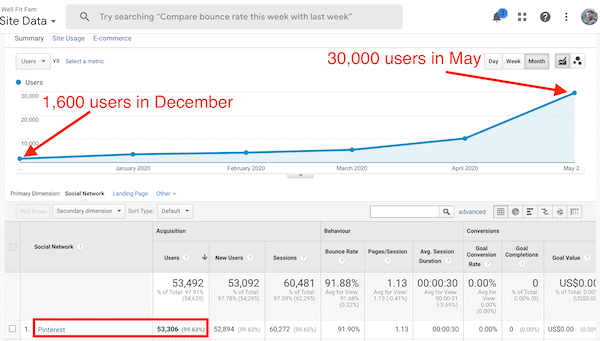
Did I mention this was on a site with only 25 posts?
Oh… and we didn’t add any posts to it between December 2019 and June 2020?
Click anywhere in this box to get Pin Design Perfection and explode your Pinterest game too!](/pin-design)
Struggling to get any real traffic from Pinterest?
Most bloggers know that Pinterest can be a great source of free traffic. But it can often feel like you are putting in a lot of time and effort and not seeing results.
Did you know that your Pin design is the main factor in someone clicking on your pin?
And you don’t need to be a graphic designer to create amazing pins. Just by following some basic design principles you can create some viral pins quickly.
This podcast with Kristin Rappaport from Applecart Lane will show you exactly how to create a pin for Pinterest that people will actually stop, save and click.
Listen on Apple Podcasts
Why graphic design matters
If you’re like me you’ve probably spent hours designing pins only to find that nobody is clicking on them.
You’re left feeling like…
So you go down the rabbit hole of thinking…
“Maybe my pinning strategy is wrong.
Or maybe I need to use Tailwind Tribes more.
No… I need a manual pinning strategy! That will fix it!!”
Well here’s the brutal truth:
Your pin design is probably terrible!
When you don’t create “Pinterest pretty” pins, people won’t even stop to look at them.
FACT!
Simply put… your graphic design matters if you want to get traffic from Pinterest or make your blog look professional.
But you don’t need to hire a professional or become a full-time graphic designer to make this happen. There are some simple tips you can learn right now to improve your Pinterest game quickly!
Best design tips: How to create viral pins for Pinterest
So you’re probably still thinking…
“But I don’t have an eye for design.”
It doesn’t matter!
By learning the simple design principles below, it’s possible to quickly improve your design skills to create pins that grab everyone’s attention.
Basic Pinterest design rules
There are some basic Pin design rules that you need to know.
This is just Pinterest best practice and will help you get those “Pinterest pretty” designs:
- The pin should be vertical (2:3 ratio i.e. 600 x 900 px… but you can play with the size)
- The image should be clear and relevant
- Text overlay helps get more clicks
- Write big enough for people to read (especially if using mobile devices)
- Warm colours tend to do better (pinky/ red)
- No pictures of someone looking at the camera
Now that’s covered let’s get to the juicy part…
1. Proximity
Proximity is basically the spatial relationship between the different elements in your design i.e.
- Header
- Subheader
- Call to action (CTA) i.e. click now to learn more
- Picture of a freebie
All you need to know is that elements that belong together, stay together (I mean… should be close to each other.)
And other elements should clearly be separated.
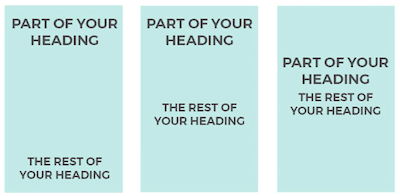
The below image shows a poor design on the left and a great design on the right!